
Airflow DAG Best Practices You Must Implement in 2026

In modern data platforms, orchestrating workflows reliably is non‑negotiable. Apache Airflow remains the de‑facto engine for workflow orchestration in data engineering, analytics, and machine‑driven ETL pipelines. Yet Airflow’s power comes with complexity and poorly designed DAGs often cause maintenance struggles, performance issues, and operational risk.
This guide provides pragmatic, production‑grade best practices for Airflow DAG design, focused on scheduling, SLA monitoring, inter‑task communication (XComs), and performance optimization.
What Is an Airflow DAG?
A Directed Acyclic Graph (DAG) in Apache Airflow is the blueprint of a workflow. It defines a structured set of tasks along with the dependencies between them, allowing Airflow’s scheduler to execute and monitor these tasks in the correct order. Essentially, a DAG describes what needs to run, in what sequence, and under what conditions.
Each DAG is written in Python, which gives data engineers and developers the flexibility to embed complex logic, set schedules, configure retries, trigger notifications, and orchestrate tasks programmatically. This “workflow as code” approach makes it easier to version, test, and maintain workflows, compared to traditional GUI-based schedulers.
Well‑designed DAGs improve reliability, reduce failures, and simplify operational visibility in production. By defining dependencies and execution rules explicitly, teams can ensure data integrity, streamline monitoring, and respond faster to errors or delays.
In short, Airflow DAGs are the backbone of scalable, robust, and maintainable data workflows, making them indispensable in modern data engineering and analytics environments.
Scheduling Best Practices
In Airflow, even the most well-structured DAG can encounter issues if it isn’t scheduled effectively. Ensuring your workflows run smoothly, reliably, and at the right time starts with adopting proper scheduling practices. Below are key considerations for building robust, maintainable schedules.
Choose the Right Interval
Selecting the correct schedule interval is critical for efficiency and cost management:
- Cron expressions: Ideal for workflows that must follow precise calendar-based schedules, such as daily reports, weekly aggregations, or business-day runs. Cron gives you the flexibility to align pipelines with operational timelines.
- Timedeltas: Best suited for fixed intervals, such as hourly ETL jobs or batch data processing pipelines. This approach is simple and predictable for pipelines that need frequent updates.
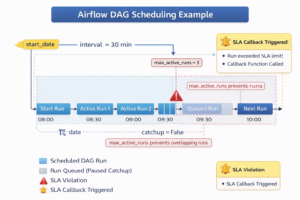
Striking the right balance between frequency and system cost is essential. Overly frequent schedules can overwhelm your infrastructure, increasing compute usage and queue delays without delivering meaningful benefits.
Set start_date and Catchup Properly
Correctly configuring start_date and catchup behavior prevents unintended runs and scheduling confusion:
- Static start_date: Always use a fixed date instead of dynamic timestamps. Dynamic dates can confuse the scheduler, trigger unexpected backfills, or create overlapping executions.
- Catchup control: Set catchup=False for pipelines where historical runs are unnecessary. This prevents Airflow from attempting to backfill past intervals, which can consume resources and introduce unwanted complexity.
Avoid Overlapping Runs
Concurrent runs of the same DAG or tasks can lead to resource contention, unexpected failures, and data inconsistencies. Airflow provides mechanisms to control parallelism:
- max_active_runs=1: Ensures a new DAG run does not start until the previous run completes. This is critical for pipelines where sequential execution is necessary.
- Task-level concurrency limits: Prevent individual tasks from overloading resources by restricting how many instances can run simultaneously.
By implementing these strategies, organizations can avoid unbounded execution queues, improve workflow reliability, and ensure predictable execution in production environments. Proper scheduling isn’t just a configuration step—it’s a foundation for operational efficiency and cost-effective pipeline management.
Managing SLAs Effectively
In enterprise workflows, timely execution is critical. Missed tasks can cascade into downstream delays, affect reporting accuracy, and impact business operations. Airflow addresses this challenge through Service Level Agreements (SLAs), allowing teams to define expected completion windows for tasks or entire DAGs. By specifying an SLA as a timedelta, you set a measurable benchmark for when a task should finish. If a task exceeds this threshold, Airflow logs the event and triggers notifications, enabling proactive intervention.
Best Practices for SLA Management
To make SLAs meaningful and actionable, organizations should follow these best practices:
- Prioritize business-critical tasks: Only assign SLAs to tasks whose timely completion impacts operational outcomes. Applying SLAs to every task can create alert fatigue and obscure truly urgent issues.
- Configure alerts: Leverage email_on_failure=True or integrate with messaging platforms like Slack to notify relevant teams immediately when an SLA is missed. Timely alerts allow faster resolution before minor delays escalate into major disruptions.
- Automate remediation: Implement callback handlers using sla_miss_callback to trigger automated responses, such as retrying a task, escalating issues, or triggering alternative workflows. This ensures that SLA breaches are managed consistently and systematically.
SLAs in Airflow are a cornerstone of enterprise workflow reliability and operational accountability. Properly implemented SLAs provide visibility into critical processes, enhance monitoring, and enable teams to maintain trust in automated pipelines.
Inter‑Task Communication with XCom
In complex workflows, tasks often need to share data or metadata to maintain execution logic and downstream dependencies. Apache Airflow provides XComs (cross-communication messages) to facilitate this communication. XComs allow tasks to push values into a shared store and enable downstream tasks to pull these values as needed, making it easier to coordinate pipelines without introducing tight coupling or external dependencies.
Best Practices for Using XComs
While XComs are powerful, effective usage requires discipline to avoid performance or operational issues:
- Use XComs for small control data: Ideal for flags, task IDs, computed parameters, or small messages that influence task logic. This keeps pipelines lightweight and manageable.
- Avoid large payloads: Storing large datasets or binary content in XCom can bloat the Airflow metadata database, leading to slower scheduler performance and higher operational overhead.
- Leverage object stores for large outputs: For substantial data outputs, push content to external storage systems such as Amazon S3 or Google Cloud Storage (GCS), and use XComs to pass only references or pointers. This approach maintains inter-task communication without compromising performance.
By using XComs judiciously, teams can manage inter-task dependencies and data flow efficiently, improve pipeline maintainability, and minimize operational overhead. When implemented properly, XComs are an essential mechanism for orchestrating complex, data-driven workflows in enterprise environments.
Performance Optimization Strategies
As Airflow workloads grow in scale and complexity, performance optimization becomes a critical factor in ensuring stable, efficient, and cost-effective workflow execution. Poorly tuned pipelines can lead to scheduling delays, task failures, and resource contention, affecting both operational efficiency and business outcomes.
Reduce DAG Complexity
Complex DAGs with deep dependency chains increase processing overhead during scheduler parsing and can slow down overall workflow execution. To optimize performance:
- Flatten dependencies where possible: Simplifying task chains reduces parsing and scheduling overhead.
- Modularize large DAGs: Break very large or monolithic DAGs into smaller, independent units. This not only improves performance but also enhances maintainability, testing, and debugging.
Tune Parallelism and Concurrency
Airflow provides several knobs to balance throughput with system stability:
- parallelism: Sets the total number of tasks that can run concurrently across the entire Airflow instance.
- dag_concurrency: Limits the number of tasks that can run simultaneously within a single DAG.
- Task pools: Isolate heavy or resource-intensive tasks to prevent them from monopolizing system resources, ensuring fair distribution across the workflow.
Properly tuning these parameters ensures that Airflow can handle high-throughput pipelines without overwhelming the executor or the scheduler.
Optimize Sensors and Retries
Sensors are a common source of resource bottlenecks because they often hold executor slots while waiting for conditions to be met. To optimize sensor performance:
- Configure poke_interval and timeout: Adjust polling frequency and maximum wait time to prevent tasks from blocking resources unnecessarily.
- Use asynchronous sensors: Asynchronous sensor modes free up executor slots, allowing other tasks to run while waiting.
- Review retry policies: Sensible retry settings prevent excessive task retries from overloading the scheduler or executor.
By following these strategies, organizations can ensure scalable, responsive, and reliable Airflow operations, even under heavy workloads. Optimized DAGs not only improve execution speed but also reduce infrastructure costs and enhance operational predictability.
Testing, Versioning, and Reliability
Airflow workflows are production-grade software that orchestrates critical business processes. Treating DAGs and tasks with the same rigor as application code ensures reliability, maintainability, and operational confidence.
Implement Comprehensive Testing
- Unit tests for task logic: Test each task independently to ensure it performs as expected under different scenarios. This helps catch logic errors before they affect production workflows.
- DAG integrity tests: Validate the correctness of DAG definitions using DagBag load testing. This step ensures that all tasks are correctly defined, dependencies are intact, and the scheduler can parse the DAG without errors.
Leverage CI/CD Pipelines
Integrating Airflow DAGs into Continuous Integration/Continuous Deployment (CI/CD) pipelines enforces quality gates before deployment. Automated pipelines can run unit tests, lint code, and verify DAG structure, reducing the risk of introducing errors into production.
Versioning for Traceability
- Version control: Store DAGs in a version control system such as Git. Each change is tracked, enabling teams to roll back faulty versions and understand the evolution of workflows over time.
- Faster root-cause analysis: Versioned DAGs make it easier to trace issues, compare changes, and identify the source of failures or SLA breaches.
By implementing testing, versioning, and CI/CD best practices, organizations ensure that Airflow pipelines remain reliable, auditable, and maintainable. This approach not only reduces operational risk but also accelerates development cycles and fosters confidence in automated workflows.
Security and Production Hardening
When running Apache Airflow in production, security should be treated as a core operational requirement. Airflow pipelines often interact with databases, APIs, and cloud storage, so protecting credentials and limiting access is essential to maintain system integrity and prevent data exposure.
Key security practices include:
- Use Role-Based Access Control (RBAC): Restrict who can view, modify, or trigger DAGs to prevent unauthorized workflow changes.
- Secure secrets management: Store credentials in secure backends such as HashiCorp Vault, AWS SSM, or Google Secret Manager instead of embedding them in DAG code.
- Maintain metadata hygiene: Regularly prune old logs, XCom records, and task metadata to keep the Airflow database efficient and manageable.
Applying the principle of least privilege and isolating sensitive configuration helps protect Airflow environments and reduces the risk of operational or data security issues.
Identifying Common Anti-Patterns
Even well-intentioned Airflow implementations can develop patterns that negatively impact performance, reliability, or maintainability. Recognizing these anti-patterns early helps teams keep their workflows efficient and easier to manage in production environments.
Treating Airflow as a compute engine
Airflow is designed to orchestrate tasks, not perform heavy data processing itself. Running large computations directly inside tasks can strain executors and slow overall pipeline performance. Instead, delegate intensive workloads to specialized systems such as Spark, data warehouses, or cloud processing services, while Airflow focuses on coordinating and scheduling these operations.
Embedding heavy logic in top-level DAG code
Placing complex logic or expensive operations at the top level of DAG files can slow down the scheduler because Airflow parses DAG files frequently. Top-level code should remain lightweight and primarily define tasks and dependencies. Any substantial processing logic should be placed inside task functions or external modules.
Overusing large XCom payloads
XComs are intended for small control messages such as IDs, parameters, or status flags. Passing large datasets or binary objects through XCom can significantly increase metadata database size and degrade system performance. For larger outputs, store data in external storage systems like S3 or GCS and pass only the reference or path through XCom.
Ignoring naming conventions and documentation
Unclear DAG names, inconsistent task naming, and missing documentation can make workflows difficult to understand and troubleshoot. Establishing clear naming standards and adding concise descriptions helps teams quickly identify pipeline purpose, dependencies, and ownership.
Avoiding these anti-patterns ensures that Airflow deployments remain scalable, maintainable, and operationally efficient as workloads grow.
Conclusion
Designing Airflow DAGs for enterprise workloads requires careful attention to scheduling, SLA management, inter-task communication, security, and performance optimization. Well-structured DAGs improve reliability, reduce operational failures, and provide clear visibility into how data pipelines run in production environments. Following proven best practices helps engineering teams build workflows that remain scalable, maintainable, and resilient as data volumes and system complexity grow.
For organizations building modern data platforms, implementing these practices consistently can be challenging without the right expertise. Acmeminds helps businesses design, deploy, and optimize production-grade data pipelines through its DevOps and Data Engineering services. From workflow orchestration and infrastructure automation to scalable analytics platforms, Acmeminds supports teams in building reliable data systems that power real-time insights and operational efficiency.
FAQs
1. What is the best schedule interval for Airflow DAGs?
Choose cron expressions for calendar-based schedules and fixed timedelta values for consistent time intervals. Avoid overly frequent DAG runs, as they can increase scheduler load and queue pressure, especially in high-volume environments.
2. How do I prevent overlapping DAG runs?
Set max_active_runs=1 for DAGs that must finish before a new run begins. You can also configure task-level concurrency limits and pools to control parallel execution and prevent resource contention.
3. When should I use XComs in Airflow?
Use XComs for passing small inter-task metadata such as IDs, flags, or status values. For large datasets or files, store the output externally (for example in cloud storage or databases) and pass only the reference path through XCom.
4. How do SLAs improve Airflow reliability?
Service Level Agreements (SLAs) define expected completion times for tasks or DAG runs. When execution exceeds the defined SLA window, Airflow triggers alerts, allowing teams to quickly identify delays and respond before downstream workflows are affected.
5. What causes slow Airflow scheduling?
Large and complex DAGs with deep dependency chains increase parsing overhead and scheduler latency. Keeping DAGs modular, limiting heavy logic in top-level code, and reducing unnecessary dependencies helps maintain efficient scheduling.
6. Should Airflow DAGs be versioned?
Yes. Versioning DAGs allows teams to track workflow changes, enforce code quality, and safely roll back to previous versions if issues occur. It also improves collaboration and transparency in production data pipelines.